Edit images with plain English on your own box
August 2026 · SearchAI Inference Server team
/v1/images/edits20B instruction editor AWS g5.2xlarge · A10Gfits 24 GB VRAM private
"Make the background a bright sunny sky." "Add a red banner across the top." "Remove the person on the left." Instruction-based image editing — type what you want changed, get the edited image back — is one of the most requested capabilities in private AI, and one of the most sensitive: product shots, ID documents, medical imagery, and internal screenshots are exactly the pixels you don't want leaving your network.
The inference server ships this behind an OpenAI-compatible endpoint:
/v1/images/edits, powered by a 20-billion-parameter
Qwen-Image-Edit-class editor running through a
stable-diffusion.cpp adapter, on your own GPU box. This post is the
measured account: the exact AWS instance, the one-line install, real
timings, and what "minutes-class editing" honestly means.
The setup — same $1.21/hour box as the GPU benchmark
Everything runs on the instance from our
GPU acceleration benchmark:
an AWS g5.2xlarge (NVIDIA A10G 24 GB, 8 vCPU, 32 GB RAM) on the
Deep Learning Base GPU AMI (Ubuntu 24.04) — Ubuntu 24.04 or
newer is required (glibc ≥ 2.36), 200 GB gp3 disk, ports 22/8081 open,
sudo apt-get install -y libomp5 first. Then one line:
curl -fsSL https://inference-server.searchblox.com/install | \
  sudo API_KEY='your-key' BACKEND=cuda MODELS='4b image' bash
The image group adds the editor add-on (~430 MB adapter)
and its three weight files (~27 GB): the Q4 diffusion transformer, a
Qwen 2.5-VL text/vision encoder, and the VAE. GPU is strongly
recommended for this one — a CPU-only edit takes tens of minutes.
Measured on the A10G
| Operation | Measured |
|---|---|
| First edit after restart (loads + converts the full ~27 GB pipeline) | ~11 min, one-time |
| Each edit after that (1200×630 input) | 2 min 51 s |
| Each edit, larger photo (1280×899 input) | 4 min 23 s |
| VRAM during editing | ~3 GB resident |
That VRAM row is the interesting one: the editor streams weights from host RAM per step, so the 20B pipeline fits comfortably next to your chat models on a 24 GB card — the same box was serving text at 119 tok/s between edits. Editing time scales with input resolution; budget three to four-and-a-half minutes per edit at typical sizes and plan batch jobs accordingly. This is a "queue it" capability, not a real-time one — the value is that the queue is yours, on your hardware, at flat cost.
Using it
The endpoint follows the OpenAI images API — multipart form, image + instruction in, base64 image out:
curl -s http://127.0.0.1:8081/v1/images/edits \
  -H "Authorization: Bearer YOUR_API_KEY" \
  -F image=@product-shot.png \
  -F prompt="Make the background a bright sunny sky" \
  | python3 -c "import json,base64,sys; \
      d=json.load(sys.stdin)['data'][0]['b64_json']; \
      open('edited.png','wb').write(base64.b64decode(d))"
Any OpenAI SDK's images.edit(...) call works the same
way with base_url pointed at your box. Edits queue behind
the same admission control as every other endpoint, so a long edit
doesn't block your chat traffic.
What it looks like — real edits from this box
Both examples below are unretouched outputs from the
curl call above, run on the g5.2xlarge during this
benchmark. Left is the input, right is what came back.
Prompt: "Make the background a bright sunny sky"
— input 1200×630, warm edit time 171 s:
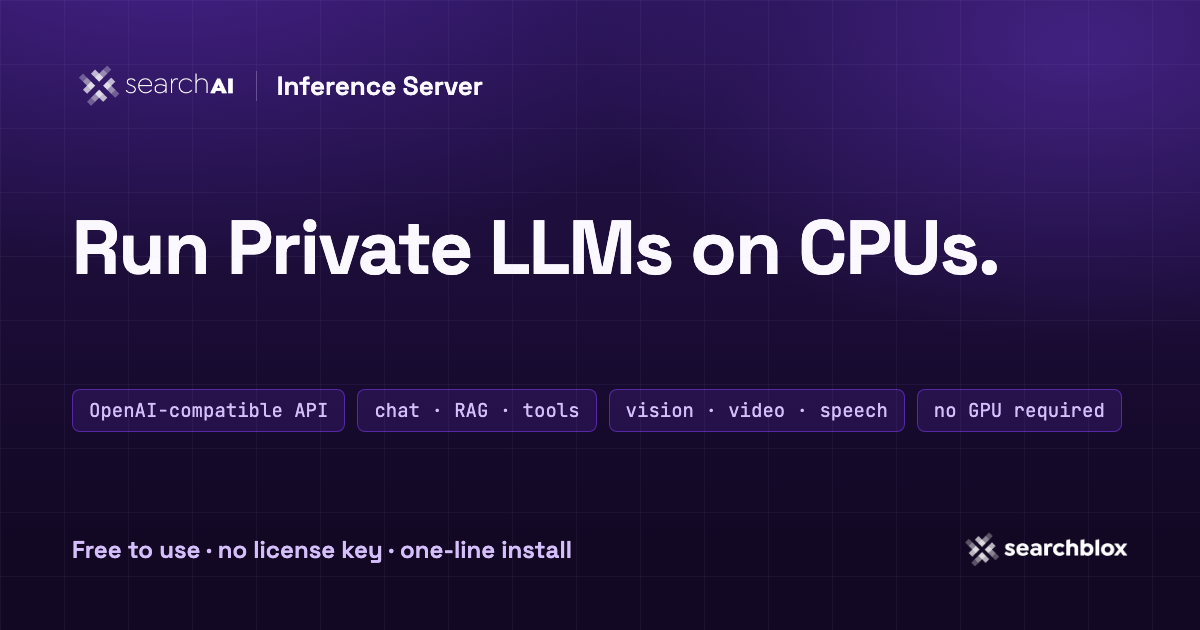
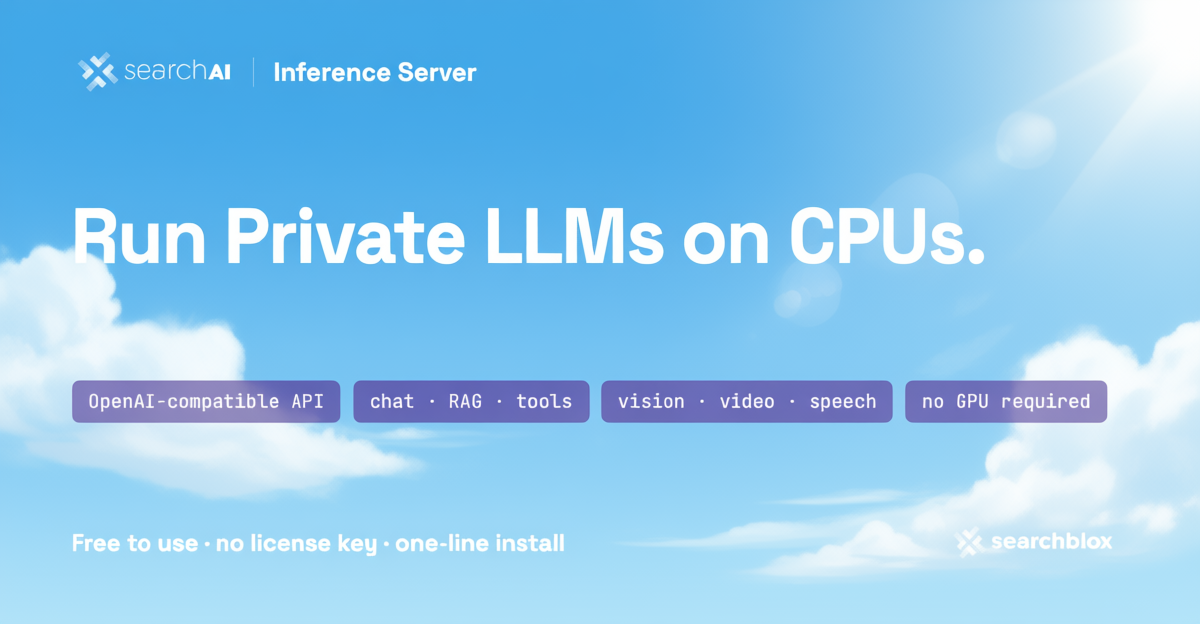
Note what it preserved: the wordmark, every pill label, and the layout — while re-lighting the entire design for a sky background. This is instruction editing, not style transfer.
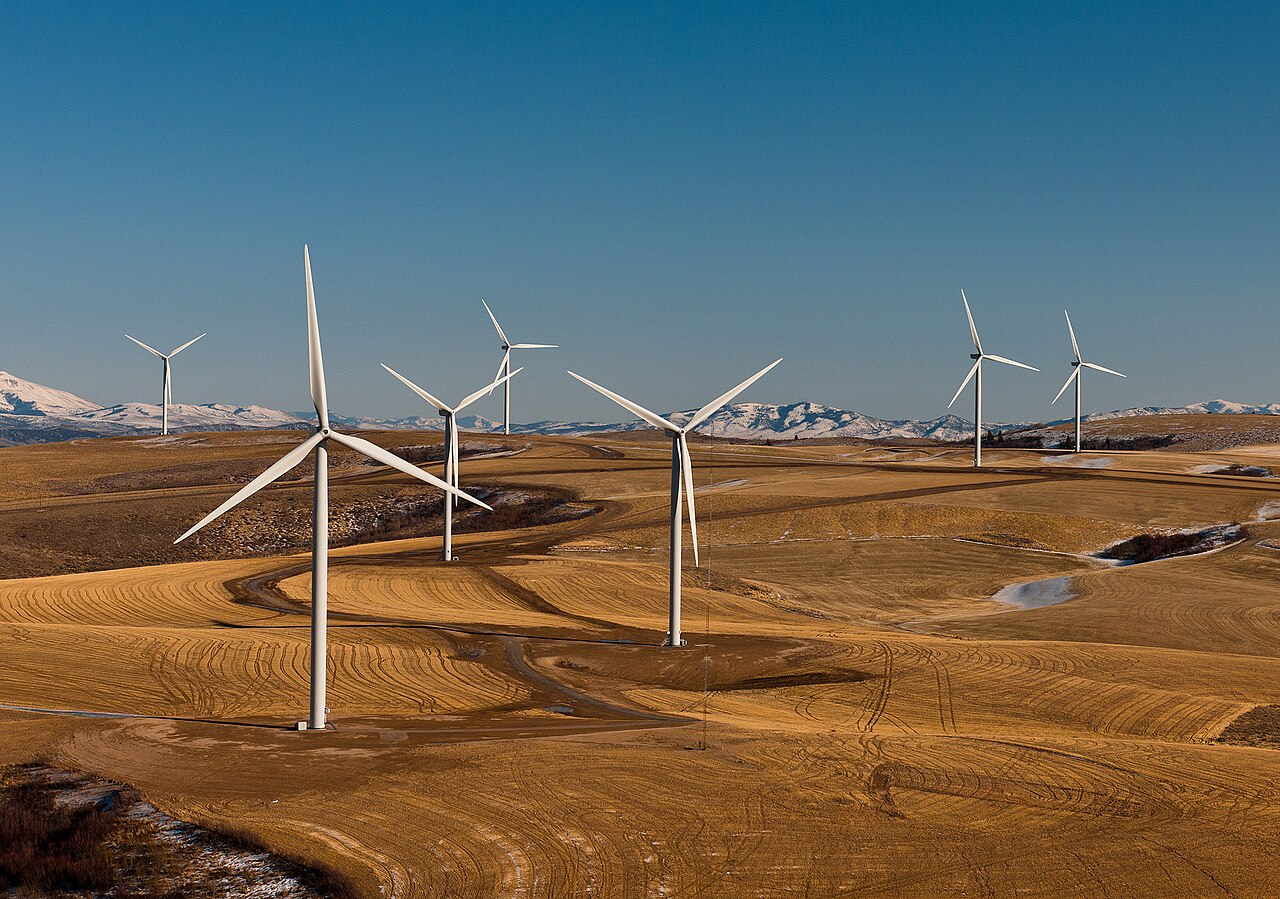
Prompt: "Turn the scene into a warm
golden sunset" — input 1280×899 (photo), warm edit time
263 s (4 min 23 s):

Honest scope
- GPU required in practice. x86_64 Linux with an NVIDIA card (A100 / A10G / L4 / RTX 40-series / H100). CPU fallback exists but is tens of minutes per edit.
- Minutes, not seconds. ~3 minutes per edit on an A10G at 1200×630. Smaller inputs are faster; this is for pipelines and workbenches, not live preview.
- One-time warmup. The first edit after a restart pays the ~11-minute pipeline load; keep the service warm for batch runs.
- Host RAM matters — more than VRAM. The weight-streaming
design maps ~27–29 GB through host memory during the pipeline load.
Measured across our boxes: 16 GB hosts cannot load the editor at
all; 32 GB is workable but borderline at the load spike — add
a swapfile (
fallocate -l 16G /swapfile && mkswap
        /swapfile && swapon /swapfile
) as cheap headroom insurance, or use a 64 GB host for comfort, especially with other models resident.
The bottom line
Instruction image editing is usually a per-image API charge on someone else's infrastructure, with your most sensitive pixels in the request body. Here it's a flag on the install line: a 20B editor behind the same private endpoint as your chat, vision, and speech models, ~3 minutes per edit on a $1.21/hour box, and nothing — not the source image, not the instruction, not the result — ever leaves your VPC.
curl -fsSL https://inference-server.searchblox.com/install | \
  sudo API_KEY='your-key' BACKEND=cuda MODELS='4b image' bash
Timings measured 2026-08-31 on g5.2xlarge as described above. GPU text/vision numbers for the same box: One flag, 4× the tokens.