Read documents with the vision models that ship free — and get clean JSON out
August 2026 · Inference Server team
visiondocument extraction Qwen 2B / 4Breal captured output try it yourself
Every install of the server comes with vision built in — the same Qwen 3.5 models that answer chat also see. No separate OCR service, no per-page cloud fee, no data leaving your box. This post is a hands-on look at pulling structured data out of document images with the 2B and 4B models — the small ones, the ones that fit a 16 GB host — with real output captured from a running server.
Everything below uses made-up documents. The four images are synthetic — invented claim numbers, a fictional "CityCare Pharmacy", a sample rate table, a dummy check drawn on a bank that doesn't exist — generated for this article. Grab them at the end and run the exact same prompts on your own documents.
First: can the small models even read a document?
Short answer — yes, and accurately. Here's a synthetic auto-claim form:
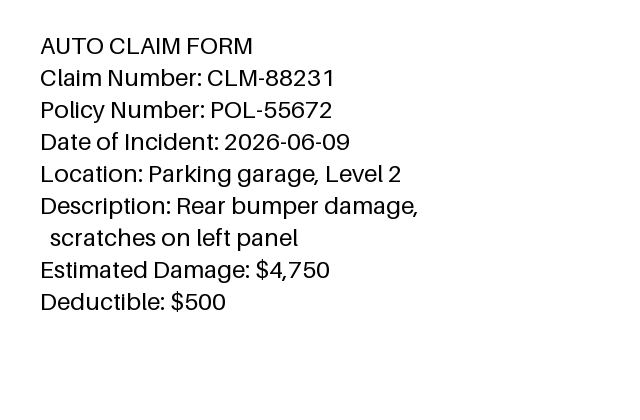
Ask q35-4b to read it (image_url in a normal
chat request), and it returns every field, correct:
Claim Number: CLM-88231
Policy Number: POL-55672
Date of Incident: 2026-06-09
Location: Parking garage, Level 2
Description: Rear bumper damage, scratches on left panel
Estimated Damage: $4,750
Deductible: $500
The 2B model reads it identically — same seven fields, same values. A 1.9 GB model that runs on a 16 GB box transcribes the form as faithfully as the 4B. So reading isn't the hard part.
The catch: asking for JSON directly doesn't stick
You want JSON your code can consume, so you do the obvious thing — a
system prompt that says "return only JSON matching this schema," even with
response_format: json_object set. Here's what the 4B actually
returns:
Here are the extracted fields from the AUTO CLAIM FORM:

- **Claim Number**: CLM-88231
- **Policy Number**: POL-55672
- **Date of Incident**: 2026-06-09
...
Let me know if you need this formatted differently.
Accurate — and useless to a parser. Vision models are trained to describe what they see, and on an image request that instinct overrides a "JSON only" instruction more often than it does on plain text. Push harder with a stricter prompt and the small model can even wander (in our runs the 2B once invented a stray image URL). Fighting the model to emit JSON while it's looking at a picture is the wrong battle.
The pattern that works: read, then structure
Split the job along the models' strengths:
- Step 1 — see. Let the vision model do what it's good at: read the image into plain text. No schema, no pressure — just "list every field and value."
- Step 2 — structure. Feed that text back as a
normal text request with your schema and
response_format: json_object. Structuring text into JSON is exactly what JSON mode nails.
Step 2 on the claim-form text — the result is clean, and byte-identical on the 2B and the 4B, numbers typed as numbers:
{"claim_number":"CLM-88231","policy_number":"POL-55672",
 "date_of_incident":"2026-06-09","location":"Parking garage, Level 2",
 "damage_description":"Rear bumper damage, scratches on left panel",
 "estimated_damage_usd":4750,"deductible_usd":500}
That parses on the first try. Both steps run on the same local model — you can even use the 2B for both and never load anything bigger.
The exact two calls — read the image, then structure the text:
# Step 1 — read the image (base64 it into the data URL)
B64=$(base64 -w0 claim-form.png)
curl http://<host>:8081/v1/chat/completions \
  -H "Authorization: Bearer $KEY" -H "Content-Type: application/json" \
  -d '{"model":"q35-4b","messages":[{"role":"user","content":[
        {"type":"text","text":"List every field and value you see on this form."},
        {"type":"image_url","image_url":{"url":"data:image/png;base64,'"$B64"'"}}]}]}'

# Step 2 — structure that text into JSON (plain text request + JSON mode)
curl http://<host>:8081/v1/chat/completions \
  -H "Authorization: Bearer $KEY" -H "Content-Type: application/json" \
  -d '{"model":"q35-4b","response_format":{"type":"json_object"},
       "messages":[
         {"role":"system","content":"Return ONLY valid JSON with keys: claim_number, policy_number, date_of_incident, location, damage_description, estimated_damage_usd, deductible_usd."},
         {"role":"user","content":"<the text from step 1>"}]}'
It holds up on tables and labels too
A rate table — the 2B transcribes the grid, then structures it into rows with correct numeric types:
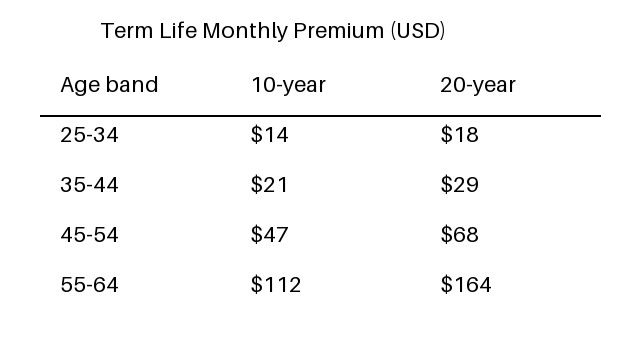
{"title":"Term Life Monthly Premium (USD)",
 "rows":[{"age_band":"25-34","ten_year_usd":14,"twenty_year_usd":18},
         {"age_band":"35-44","ten_year_usd":21,"twenty_year_usd":29},
         {"age_band":"45-54","ten_year_usd":47,"twenty_year_usd":68},
         {"age_band":"55-64","ten_year_usd":112,"twenty_year_usd":164}]}
And a pharmacy label — the 4B reads every line and folds the two-line directions into one field:
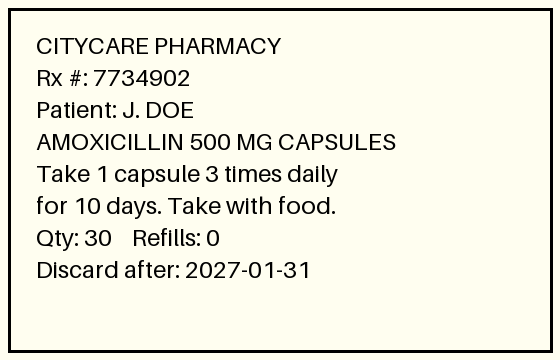
{"pharmacy":"CITYCARE PHARMACY","rx_number":"7734902","patient":"J. DOE",
 "drug":"AMOXICILLIN 500 MG CAPSULES","strength":"500 MG",
 "directions":"Take 1 capsule 3 times daily for 10 days. Take with food.",
 "quantity":30,"refills":0,"discard_after":"2027-01-31"}
Financial services: a check
The pattern earns its keep on the documents that matter for financial-services work — where the fields are dense and a wrong digit is a real problem. Here's a dummy check (fictional bank, made-up routing and account numbers):
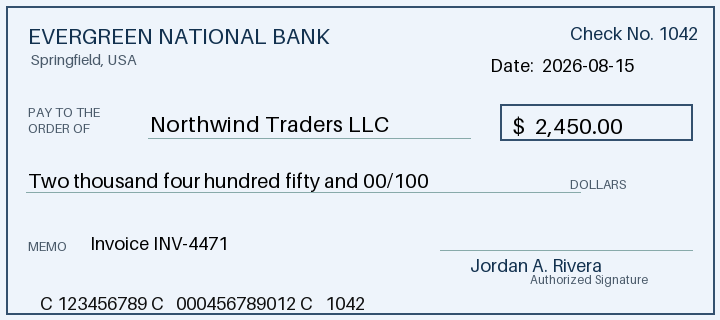
Read it, then structure it — the 4B pulls the payee, both amount forms, the memo, and the routing/account numbers off the MICR line into clean JSON:
{"bank":"EVERGREEN NATIONAL BANK","check_number":"1042",
 "date":"2026-08-15","payee":"Northwind Traders LLC","amount_usd":2450.00,
 "amount_words":"Two thousand four hundred fifty and 00/100 DOLLARS",
 "memo":"Invoice INV-4471","routing_number":"123456789",
 "account_number":"000456789012"}
One instructive difference here: the MICR line uses transit symbols
around the numbers. The 4B stripped them cleanly
("123456789"); the 2B left one attached
("C123456789"). Everything else matched. That's the kind of
messy-edge case where the extra capability of the 4B earns its slightly
higher cost — and exactly the thing you'd catch by testing on your own
documents before you ship.
2B or 4B?
On these clean documents both models read every field correctly and produce the same JSON — so the smaller, cheaper, faster one is the right default. Reach for the 4B (or 9B) when your inputs get harder: low-contrast scans, dense multi-column layouts, handwriting, or forms where a missed field is expensive. The move is the one from our prompt-optimization post — start on the small model, and only step up if your own documents actually need it. Testing that is free and local, so there's no reason to guess.
Try it on your own documents
The three sample images are yours to download — run the exact prompts above, then swap in your own forms, receipts, and labels:
Install the server (Linux, one line) — the 2B and 4B vision models come with it:
curl -fsSL https://inference-server.searchblox.com/install | sudo bashThen the read step is a normal chat request with an image, and the
structure step is a normal chat request with your schema — both on
http://<host>:8081/v1/chat/completions, both
OpenAI-compatible, both running entirely on your own box. No page fees,
no upload, no data leaving the network.
Every model response above was captured from
q35-2b and q35-4b on a running SearchAI
Inference Server, greedy decoding, August 2026, on the synthetic images
shown. See the model catalog for the full
vision line-up and the companion post
Optimize the prompt,
shrink the model for the small-model efficiency argument.